vscode
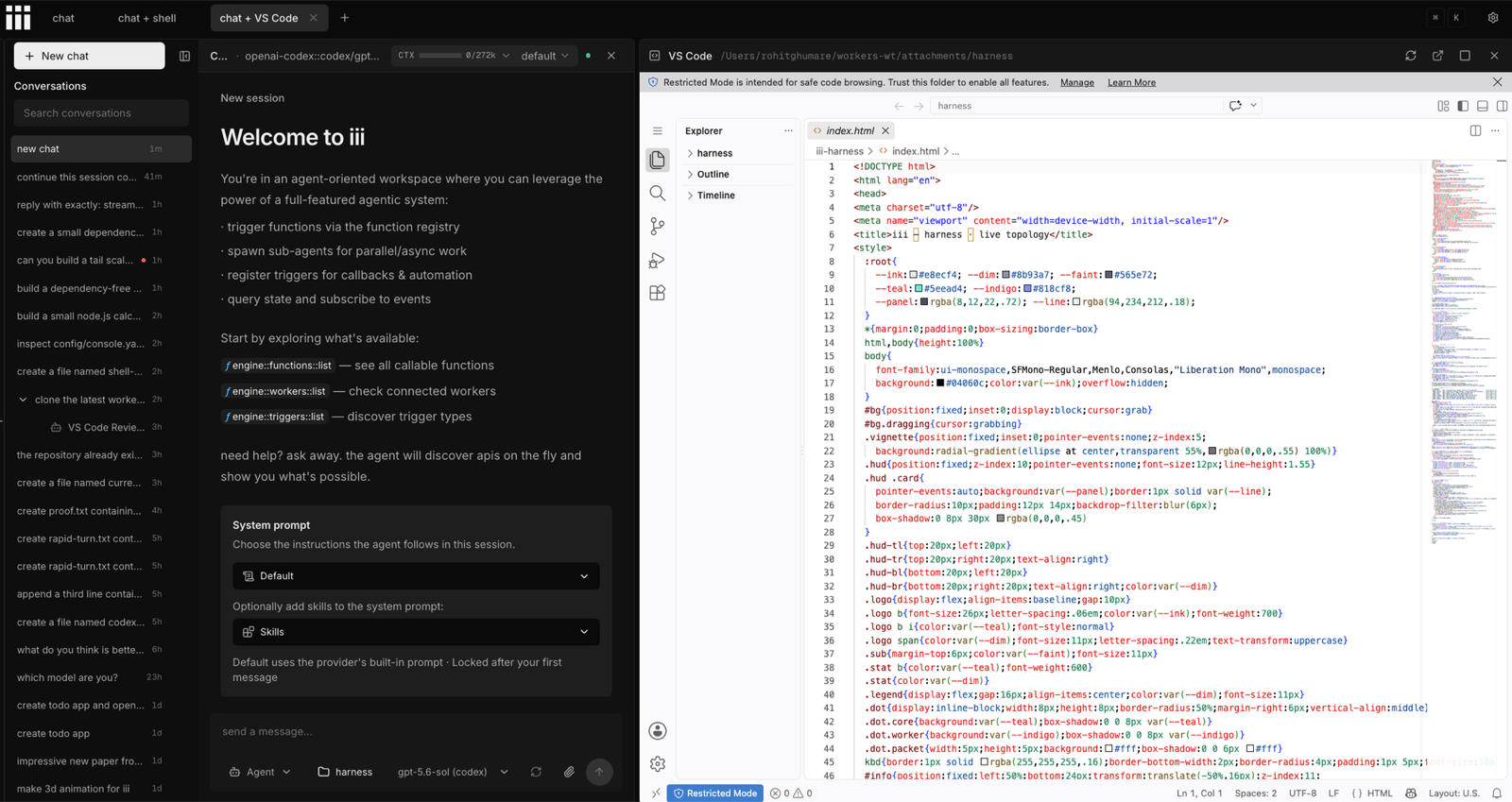
v0.1.5VS Code as an iii worker — vscode::* functions run the VS Code Server through the code CLI per workspace, and a Console page embeds the Workbench for the working directory.
 iiiverified
exact versions are immutable; binary and bundle artifacts are digest-pinned.
configuration
- bind_host: 127.0.0.1
  code_executable:
  data_dir: ~/.iii/vscode
  engine_url: ws://127.0.0.1:49134
  port_max: 18180
  port_min: 18080
  start_timeout_ms: 180000
  stop_grace_ms: 5000
readme
open as markdownvscode
VS Code as an iii worker. The worker runs the VS Code Server through the code CLI, one loopback process per workspace directory with its own isolated profile, and ships a VS Code page for the Console that embeds the Workbench for the chat's working directory. Nothing is re-implemented: it is the same web Workbench the CLI serves, with your extensions, settings sync, and terminals, beside the conversation.
Install
iii trigger compose::add worker=vscodeiii trigger compose::add declares the worker in worker-compose.yaml and starts it as part of the Compose project. The host needs the VS Code CLI: install VS Code and enable the code shell command, or download the standalone CLI and point code_executable at it. The first start of a workspace downloads the matching VS Code Server build; starting the worker accepts the VS Code Server license terms.
Quickstart
Open VS Code from the Console navigation, or press ⌘K and run Open VS Code. The page starts a server for the chat's working directory and shows the Workbench; with no working directory it lists the Console's recent folders. Its ⌘K rows reload the Workbench, open it in a browser tab, and stop the server.
The same lifecycle is one function call away:
iii trigger vscode::start workspace=/absolute/path/to/project{
"id": "ide-19edab41331d",
"name": "VS Code",
"workspace": "/absolute/path/to/project",
"host": "127.0.0.1",
"port": 18080,
"pid": 21709,
"started_at": "2026-08-26T15:28:58.711Z",
"status": "running",
"exit_code": null
}Calling vscode::start again for the same folder returns the running server. vscode::instances::list shows every server the worker owns, vscode::stop stops one, and vscode::delete also removes its data directory with delete_profile: true. Another worker opens a specific folder in the page with host.panels.open({ pageId: 'vscode', context: { workspace: '/path' } }).
Configuration
config.yaml seeds the configuration worker on first boot; after that the live value under the id vscode is authoritative and hot-reloads, so the Console's global Settings modal is the place to change it.
code_executable: ""          # path to the VS Code CLI; empty = `code` on PATH
data_dir: ~/.iii/vscode      # one server-data + cli-data folder per workspace
bind_host: 127.0.0.1         # loopback only: 127.0.0.1, localhost, or ::1
port_min: 18080              # one port per running workspace
port_max: 18180
start_timeout_ms: 180000     # first start downloads the server build
stop_grace_ms: 5000          # SIGTERM to SIGKILL
engine_url (or --url / III_URL) is bootstrap and never hot-reloads.
Run from source with compose
Workers in this repository run locally through iii compose. Add a container to the compose file next to the workers it should join:
containers:
  vscode:
    worker: path://../vscode
    scripts:
      run: pnpm install --ignore-workspace && pnpm build:bundle && node dist/bundle/index.mjs
Compose supplies the engine URL and the project namespace to the process, so the page shows up in the Console served by the same compose file. A worker started by hand instead needs III_NAMESPACE= in its environment, or the Console never sees its page. III_VSCODE_UI_WATCH=1 serves the page from ui/dist and hot-reloads it into open Console tabs while pnpm --dir ui watch runs.
Security
Browsers drop the VS Code Server connection-token cookie inside a cross-origin Console iframe, so the worker runs the server in cookie-free mode and refuses to bind anywhere but loopback. The server exposes the host filesystem to the local browser; vscode::start and vscode::instances::list are allowed for agents by default, vscode::stop and vscode::delete need approval.
The server is meant for a local single-user Console. Remote or multi-user deployments need a same-origin authenticated proxy in front of it before relaxing this.